The objective of this article is to make you understand the main difference that exists today between Framer and Webflow, useful for understanding which of the two is the right tool for your next project.
The main difference between Framer and Webflow is the level of abstraction from the code.
What does this mean?
Webflow uses names and properties that are closer to CSS, while Framer is much more similar to Figma.
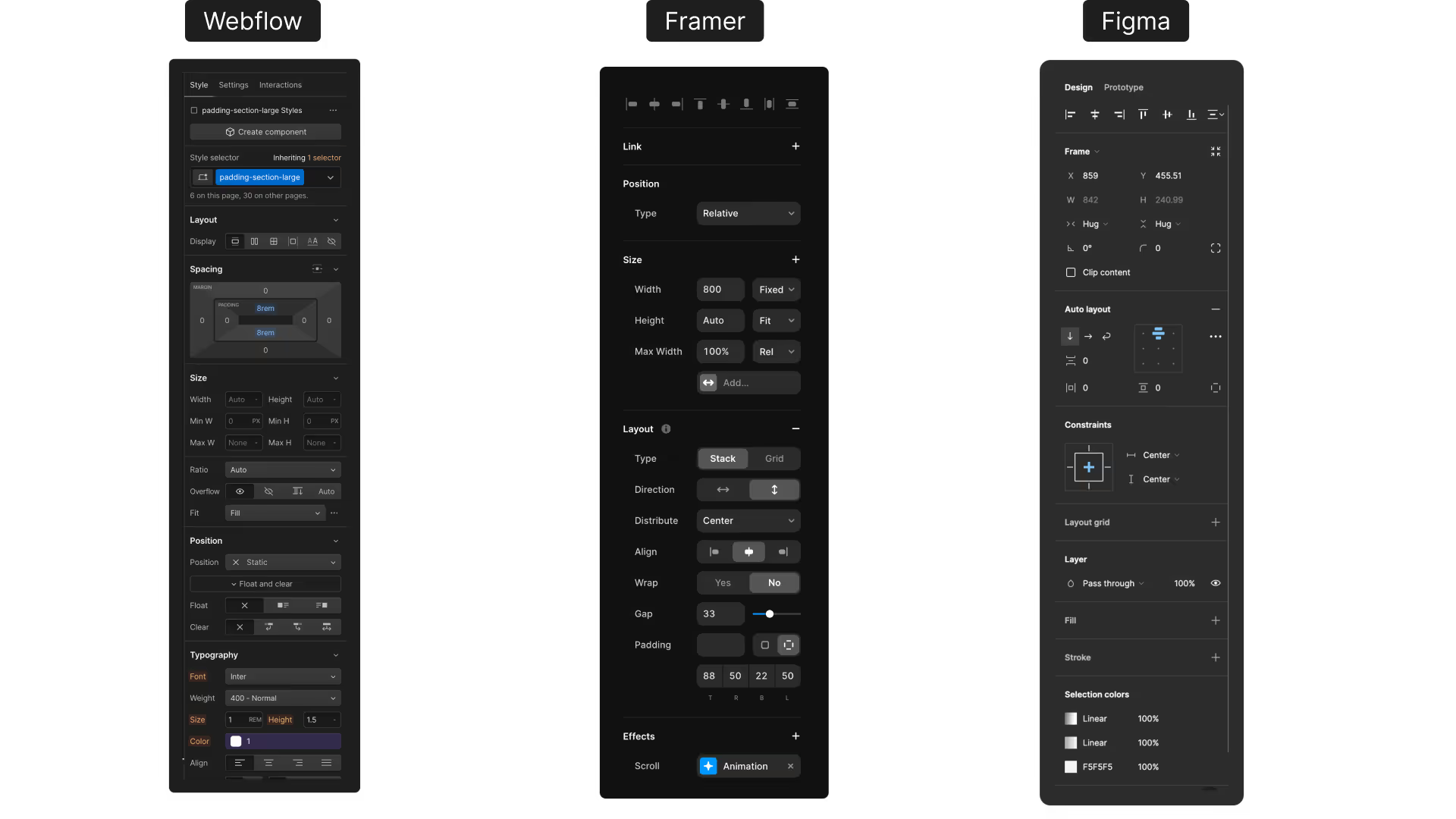
For this reason many designers prefer Framer over Webflow, it is faster to create small sites or landing pages, but it can become a problem on more complex projects where we need more control and a structure to manage multiple pages, and integrate external libraries.
Webflow has a higher learning curve than Framer but it allows you to learn the basics of programming, manage larger projects, and is easier to integrate with other tools.
There's also a deeper distinction that goes beyond the UI: Webflow can be the foundation of a full web application, while Framer cannot.
By pairing Webflow with Wized (a frontend logic layer) and Xano (a no-code backend and database), you can build fully dynamic web apps, authenticated dashboards, e-learning platforms, SaaS products, marketplaces, all inside a Webflow frontend. Framer has no equivalent pathway for backend integration at this level.
Webflow vs Framer: Key Differences
| Webflow | Framer | |
|---|---|---|
| Mental model | Close to CSS / HTML | Close to Figma |
| Learning curve | Higher | Lower |
| Best for | Complex sites, web apps, SaaS | Landing pages, portfolio sites |
| CMS | Yes, robust, built-in | Yes, limited |
| Web app capabilities | ✅ Yes (with Wized + Xano) | ❌ No |
| Backend integration | ✅ Full (Xano, Supabase, custom APIs) | ⚠️ Limited |
| Integrations | Extensive (Wized, Xano, Make, Zapier...) | Limited |
| Custom code | Full control | Partial |
| Animations | Native interactions + custom code | Easy, Figma-like |
| Hosting | Webflow hosting or export | Framer hosting only |
| Price | From $14/mo (Basic) | From $0 (free tier) |
When to Use Webflow
Choose Webflow when:
- You're building a multi-page marketing site with complex navigation, CMS, and SEO requirements
- You need deep integrations with external tools (Wized, Xano, Make, Zapier, HubSpot)
- You want to build a web application, authenticated dashboards, course platforms, SaaS products, by connecting Webflow to Wized and Xano as your backend
- You need full control over the HTML/CSS structure, Webflow's output is cleaner and more predictable for developers
- Client handoff matters, Webflow's CMS editor is more intuitive for non-technical users managing long-term content
When to Use Framer
Choose Framer when:
- You need to launch a landing page or portfolio quickly and design is the top priority
- Your team comes from a Figma background and wants the shortest possible learning curve
- The project is small in scope, one or a few pages, minimal integrations
- You want impressive animations and interactions with less setup than Webflow
- You're a designer who doesn't want to think about CSS properties
- There's no need for a backend or dynamic application logic
Frequently Asked Questions
Is Webflow better than Framer?
Neither is universally better, they serve different use cases. Webflow is better for complex, scalable projects with CMS needs, external integrations, and especially web app development. Framer is better for fast, design-heavy landing pages where time-to-launch matters more than flexibility.
Can Framer replace Webflow?
For simple landing pages and portfolios, Framer can absolutely replace Webflow. For anything involving a CMS, complex integrations, web application logic (e.g., connecting to a backend like Xano via Wized), or multi-language support, Webflow is the stronger choice, and Framer has no equivalent.
Is Framer easier to learn than Webflow?
Yes, significantly. Framer's interface is closer to Figma, making it immediately familiar to designers. Webflow's interface mirrors CSS concepts (flexbox, grid, positioning), which gives you more control but requires more time to master.
Can I build a web app with Webflow?
Yes. By connecting Webflow to Wized (a frontend logic layer) and Xano (a no-code backend), you can build fully dynamic web applications: user authentication, role-based access, dashboards, e-learning platforms, and more. This is one of Webflow's key advantages over Framer, which doesn't support backend integration at this level.
Which is better for SEO, Webflow or Framer?
Both generate clean, crawlable HTML. Webflow gives you more granular control over technical SEO elements (canonical tags, redirect rules, sitemap configuration) and has a more mature ecosystem for SEO-focused workflows. For most projects, the SEO difference is negligible.
Can I use Webflow and Framer together?
Rarely necessary. Some teams use Framer for rapid prototyping and then rebuild in Webflow for production. In practice, it's better to pick one and commit to it for a given project.