
Webflow CMS limits the number of items, collections, and fields you can use depending on your plan. If you've hit — or are approaching — one of these limits, here's everything you need to know and the best ways to work around them.
Webflow CMS Limits by Plan
| Plan | CMS Items | Collections |
|---|---|---|
| Basic | 0 | 0 |
| CMS | 2,000 | 20 |
| Business | up to 20,000 | 40 |
| Enterprise | Custom | Custom |
Solution 1: SEO-friendly Content
If your content needs to be public and easily indexed by search engines, but you have reached or are close to the 20,000-item limit in Webflow CMS, the only workaround currently is to continue using Webflow CMS and create an automation to remove items from the CMS that are no longer needed and store them in an external database (for example, if an item doesn't need to be public after X days). Alternatively, you can upgrade to the Webflow Enterprise plan (which can cost from $15k to $60k per year). This limitation exists because SEO-friendly content must be generated on the backend, and within Webflow, this is only possible using their built-in CMS.
Solution 2: Non SEO-friendly Content
If it's not necessary for your content to be indexed — for example, everything inside a restricted or members-only area — there are other solutions that don't require upgrading to the Enterprise plan, saving a significant amount of money.
The best solution, in my opinion, is to use the WWX stack because it is scalable and robust. However, unlike the first solution, it is more advanced and may be more complex for those unfamiliar with web development. Let's first look at the individual tools and then see how they work together to solve the 20k limit problem.
WWX stands for Webflow, Wized, and Xano.
Wized
Wized is similar to Webflow but for creating front-end logic. It allows you to create requests, conditions, and many other features to add dynamism to your Webflow project. It should not be confused with Zapier, which works on the backend. Wized generates JavaScript and operates in the browser.
Xano
Xano is, in my opinion, the best no-code tool for building a backend. It includes backend logic similar to Zapier and a database. Xano was built with scalability and security in mind.
Webflow
Webflow is the most powerful no-code tool for creating web interfaces and websites.
How it works
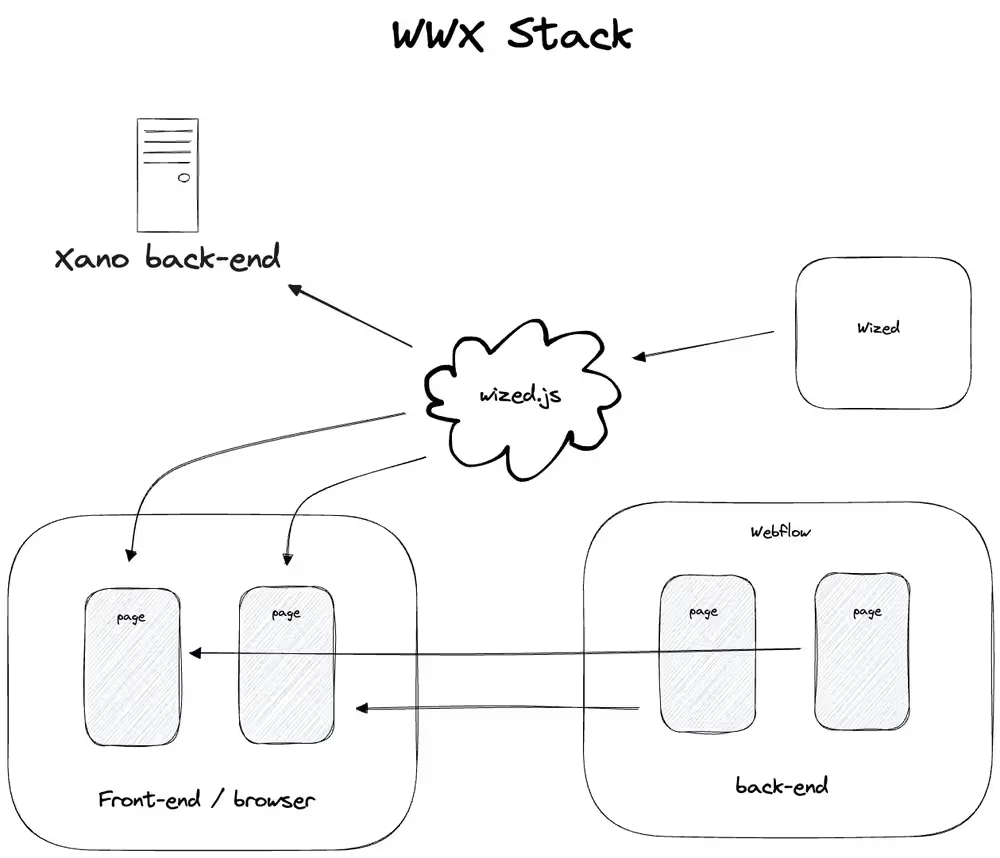
You use Webflow to create the site and its various components. You then convert these components into Wized elements to use them within Wized. On Wized, you can retrieve data from Xano or other databases or platforms and insert that data into Webflow. This way, you can eliminate Webflow CMS and consequently the 20k item limit!
Unlike Webflow CMS, which generates content on the backend so Google finds it fully rendered, with Wized the content is generated on the client side. This means that Google won't find the content immediately available because the Wized JavaScript script that retrieves the data needs to run first1. This is why it's excellent for creating web apps or dynamic websites. If you need to generate SEO-friendly content, it's better to use Webflow CMS.
Solution 3: Reverse Proxy
A reverse proxy lets you host your content on an external platform — like Next.js or any other framework — while making it appear under your Webflow domain. For example, you could serve yoursite.com/blog from a completely separate server, without your visitors ever noticing the difference.
This effectively removes the Webflow CMS limit since your content lives entirely outside of Webflow.
The main trade-off: you lose access to Webflow's UI components and templates. Your external platform won't share Webflow's design system, so you'll need to rebuild your frontend separately.
It's also worth noting that setting up a reverse proxy is a technically complex process — it's not something you can do through Webflow's interface. It requires server configuration, DNS management, and ongoing maintenance. This approach makes sense only if you're comfortable with code, or you're working with a developer, and your content needs have truly outgrown what Webflow CMS can handle at any plan level.
To Recap
If your goal is to generate SEO-friendly content, the best option today is to stick with Webflow CMS. If SEO is not a priority, you can use Wized and Xano to generate content client-side. If you've outgrown Webflow entirely and have the technical resources, a reverse proxy can give you full flexibility — but comes with added complexity.
Bonus
The Wized team has server-side rendering in its roadmap. This would make it possible to generate SEO-friendly content with Wized as well, but for now, there's no information on when it will be released.
Footnotes
-
To be exact, since 2014, Google has claimed to be quite skilled in rendering JavaScript websites but has always advised caution on this topic because rendering isn't always guaranteed. If the JavaScript code is incorrect or generates errors, Google may not be able to render the page correctly. Therefore, if you want to ensure that crawlers can read your content reliably, the best and safest option is still server-side rendering. This way, the content is generated on the server and delivered fully formed to the crawlers, without requiring them to interpret any JavaScript. ↩