If you're building a Webflow project that needs protected pages, paid memberships, or user-only content, you've probably already hit the wall: Webflow's native Membership feature has been discontinued, leaving a gap that no single platform fills perfectly.
The good news? In 2025/2026 the ecosystem has matured significantly. You now have three strong approaches, and a fourth hybrid option that combines the best of each.
This article breaks them all down: how they actually protect your content, where each one shines, and where it falls short. By the end, you'll know exactly which path makes sense for your project.
At a Glance
| Memberstack | Outseta | Wized + Xano | Hybrid | |
|---|---|---|---|---|
| Protection | Frontend | Frontend | Backend | Both |
| Setup speed | Fast | Fast | Slow | Medium |
| Starting price | $29/mo | $47/mo | From $0 | Combined |
| Transaction fee | 4% + ~0.7% | 2% | 0% | Depends |
| CRM / Email built-in | ❌ | ✅ | ❌ | Depends |
| Best for | Content sites, courses | Membership businesses, SaaS | Web apps, sensitive data | Complex projects |
The Core Question: Frontend vs Backend Protection
Before comparing tools, you need to understand a fundamental concept that will shape every decision: where does the protection actually happen?
Frontend Protection (browser-side)
Both Memberstack and Outseta work primarily on the frontend. When a visitor lands on a protected page, JavaScript runs in their browser, checks whether they're logged in, and either shows or hides content accordingly.
The critical implication: the data has already arrived in the browser before the check runs. A technically savvy user can inspect the page source, disable JavaScript, or intercept network requests and potentially access content they shouldn't see.
This isn't theoretical, it's the Memberstack co-founder himself confirming it publicly in a forum:
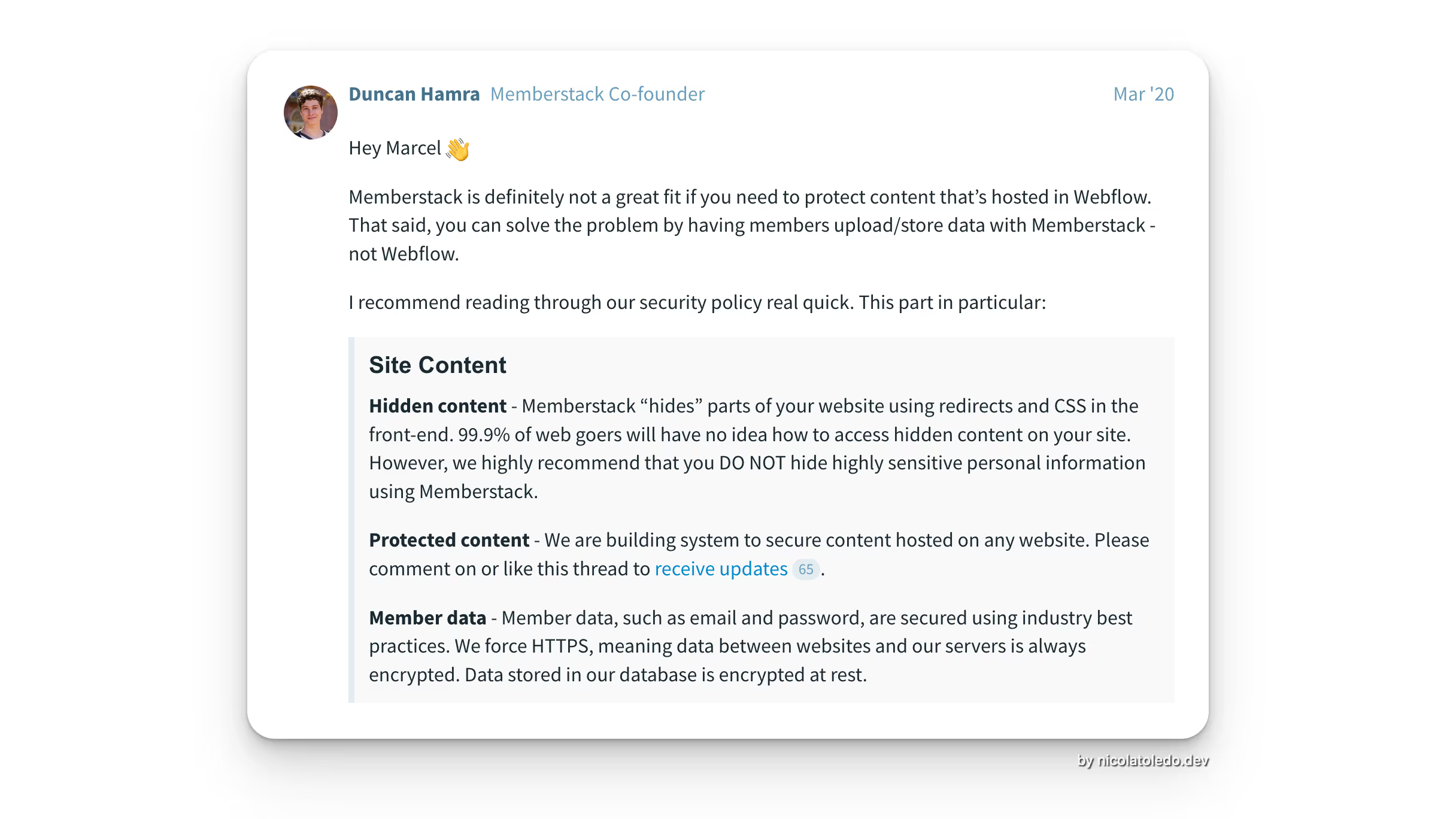
This is not a flaw, it's a design trade-off. For the vast majority of Webflow projects (courses, newsletters, community portals), frontend protection is perfectly adequate. The effort required to bypass it far exceeds the value of the content for most users.
Backend Protection (server-side)
When you use Xano as your backend, the rules of the game change entirely. With Xano, you can protect your API endpoints directly on the server. If a user doesn't have a valid authentication token, the API simply returns nothing, no data ever reaches the browser.
This means:
- No JavaScript tricks can bypass it
- Inspecting the page source reveals nothing sensitive
- The protection works even if the Webflow frontend is somehow compromised
The trade-off: backend protection requires more setup, more technical expertise, and you're responsible for building and maintaining more of the infrastructure yourself.
The bottom line: For sensitive data (financial information, proprietary content, user-submitted private data), backend protection via Xano is the only truly safe approach. For most membership sites, frontend solutions like Memberstack or Outseta are perfectly sufficient, and much faster to implement.
Option 1, Wized + Xano: Full Custom, Maximum Security
Best for: Projects with sensitive data, complex custom logic, or where you need full ownership of the backend.
How it works
Wized acts as the bridge between Webflow and Xano. When a user logs in, Xano issues an authentication token. Wized stores this token and passes it with every subsequent API call. If the token is missing or invalid, Xano blocks the request at the server level, no data ever gets sent to the browser.
This gives you true backend-level protection: the gold standard for data security in a no-code/low-code stack.
Pros
- ✅ Maximum security, data is blocked at the API level, not just hidden in the browser
- ✅ Full flexibility, you control every aspect of user logic, roles, permissions
- ✅ No transaction fees, Xano doesn't take a cut of your revenue
- ✅ Scale without limits, your backend logic can grow as complex as you need
- ✅ Ideal for web apps, not just content sites
Cons
- ❌ Highest development time, requires designing and building your own backend flows
- ❌ No out-of-the-box email marketing, CRM, or help desk
- ❌ You're responsible for maintaining the backend over time
- ❌ Steeper learning curve for the client if they need to manage users themselves
When to choose it
Choose Wized + Xano when you're building a product (SaaS, marketplace, internal tool) rather than a content site, or when the data you're protecting is genuinely sensitive enough to justify the additional development investment.
Option 2, Memberstack
Best for: Content membership sites, course platforms, communities built on Webflow, especially if you want fast time-to-launch.
How it works
Memberstack integrates into Webflow via a script tag and a library of custom data attributes. You define plans, gate content by plan, and handle payments through Stripe, all without leaving the Webflow Designer for most tasks. The protection is frontend-based: Memberstack checks the session in the browser and shows or hides content accordingly.
Pros
- ✅ Deepest Webflow integration, 650+ ready-to-use Webflow components, 100+ templates
- ✅ Extensive social login options, Google, GitHub, Facebook, LinkedIn, Dribbble, Spotify
- ✅ Large and active Webflow community, finding help, tutorials, and experts is easy
- ✅ Free plan to start, no credit card required to test
- ✅ Full design control, build whatever you want in Webflow, Memberstack powers it
- ✅ Supports 135+ currencies
- ✅ Cheaper starting price ($29/month vs Outseta's $47/month)
Cons
- ❌ Frontend-only protection, data is hidden in the browser, not blocked at the source
- ❌ Transaction fees start at 4% (higher than Outseta's 2%)
- ❌ Additional Stripe Billing fees (~0.7% per transaction) that Outseta doesn't charge
- ❌ No built-in CRM, email marketing, or help desk, you'll need separate tools (and integrations)
- ❌ Data lives in Memberstack's system, less flexibility to build complex custom logic around it
When to choose it
Choose Memberstack when your priority is speed of development and rich out-of-the-box features for a Webflow-native membership experience. If your project is a course platform, paid newsletter, or community site and you want to launch fast, Memberstack is the most battle-tested option in the Webflow ecosystem.
Option 3, Outseta
Best for: Founders building membership businesses or SaaS products who want a single platform to manage the entire operation, not just authentication.
How it works
Like Memberstack, Outseta operates primarily on the frontend for content gating. But it goes significantly further in scope: beyond auth and payments, Outseta includes a built-in CRM, email marketing and automations, a help desk with live chat and support tickets, member engagement tracking, and financial/cancellation reporting.
The promise is replacing a stack of 4–5 tools (HubSpot + Mailchimp + Intercom + Memberstack + reporting) with a single platform.
Pros
- ✅ True all-in-one, CRM, email, help desk, payments, and auth under one roof
- ✅ Lower transaction fees, starts at 2% (vs Memberstack's 4%) and drops to 1% on higher plans
- ✅ No hidden Stripe Billing fees, you save ~0.7% per transaction vs Memberstack
- ✅ Built-in team/group membership support, ideal for B2B use cases
- ✅ Free trials, cancellation surveys, member engagement tracking, built in
- ✅ Official Webflow App integration, no coding required for basic setup
- ✅ Better for SaaS products, designed for the full customer lifecycle
Cons
- ❌ Frontend-only protection (same limitation as Memberstack)
- ❌ Higher starting price ($47/month vs Memberstack's $29/month)
- ❌ Fewer Webflow-specific resources, only ~5 templates vs Memberstack's 100+
- ❌ Less flexibility for social login options
- ❌ Smaller Webflow community presence, less peer support and third-party tutorials
- ❌ The all-in-one nature means you're locked into Outseta's tools for email/CRM
When to choose it
Choose Outseta when you're building a membership business or SaaS and you want a single platform that grows with you. If you're doing significant revenue and the transaction fee difference matters, or if you need CRM and email built-in from day one, Outseta's economics often win over time.
Option 4, The Hybrid Approach: Best of Both Worlds
Best for: Projects that need both the ease of Memberstack/Outseta AND backend-level data security or complex custom logic.
How it works
This is where things get interesting. Nothing stops you from using Memberstack or Outseta for authentication and membership management, while also connecting to Xano for your backend logic and data.
Here's what that looks like in practice:
- Memberstack/Outseta handles: user registration, login, plan management, payments, frontend gating of basic pages
- Xano handles: sensitive data storage, complex business logic, protected API endpoints that require a valid auth token
When a user logs in via Memberstack or Outseta, you can pass their identity to Xano and issue a Xano token for API calls. This way, sensitive API endpoints remain protected at the backend level, while you still benefit from the out-of-the-box features of your membership platform.
Why this matters
Consider a platform where:
- A logged-in user can see basic community content (protected by Memberstack frontend gating)
- But their personal dashboard with financial data, private messages, or proprietary content hits Xano APIs that are blocked at the server unless authenticated
This hybrid architecture gives you:
- Fast development for standard membership features (templates, social login, payment flows)
- Maximum security where it actually matters
- Full control over custom backend logic without reinventing user management from scratch
Pros
- ✅ Speed of development for standard features (Memberstack/Outseta handles the 80%)
- ✅ Backend security for sensitive data (Xano handles the 20% that truly needs it)
- ✅ Keep the ecosystem advantages (templates, components, integrations)
- ✅ Full control over custom logic in Xano
- ✅ Future-proof, you can extend backend capabilities without changing the frontend auth
Cons
- ❌ More moving parts, two platforms to maintain and keep in sync
- ❌ Higher complexity for edge cases (e.g., handling plan downgrades that affect API access)
- ❌ Requires a developer who understands both platforms
Comparison Table
| Wized + Xano | Memberstack | Outseta | Hybrid | |
|---|---|---|---|---|
| Protection level | 🔒🔒🔒 Backend | 🔒 Frontend | 🔒 Frontend | 🔒🔒 Both |
| Development speed | ⚡ Slow | ⚡⚡⚡ Fast | ⚡⚡⚡ Fast | ⚡⚡ Medium |
| Webflow templates & components | ❌ None | ✅ 100+ templates, 650+ components | ⚠️ ~5 templates | ✅ Full Memberstack library |
| Social login | Custom | ✅ Google, GitHub, Facebook, LinkedIn, Spotify... | ⚠️ Limited | ✅ Full Memberstack options |
| CRM built-in | ❌ | ❌ (integrate separately) | ✅ | Depends on platform |
| Email marketing built-in | ❌ | ❌ (integrate separately) | ✅ | Depends on platform |
| Help desk built-in | ❌ | ❌ | ✅ | Depends on platform |
| Transaction fee | 0% | 4% (+ ~0.7% Stripe Billing) | 2% (no extra Stripe fees) | Depends on platform |
| Starting price | Xano from $0 (limited) | $29/month | $47/month | Combined costs |
| Team memberships | Custom | ✅ | ✅ | ✅ |
| Best for | Web apps, sensitive data | Webflow content sites | Membership businesses, SaaS | Complex projects needing both |
Which Option Is Right for You?
Use this as your decision guide:
Choose Wized + Xano if:
- You're building a product (SaaS, internal tool, marketplace) not just a content site
- You're handling genuinely sensitive data (financial records, private user data, proprietary content)
- You need fully custom user roles, permissions, or complex conditional logic
- Transaction fees at scale are a major concern
Choose Memberstack if:
- You want the fastest path to launch on Webflow
- Your project is a course, community, newsletter, or content membership site
- The Webflow component library and template ecosystem are important to you
- Your budget is tighter or you want to test before committing
Choose Outseta if:
- You're building a membership business or SaaS and want one platform to manage everything
- You're doing real revenue and the lower transaction fees justify the higher base price
- You need CRM, email, and help desk tools without assembling them from separate subscriptions
- You have B2B or team membership requirements
Choose the Hybrid approach if:
- You have a mix of standard membership needs AND sensitive data/custom logic
- You want fast development for 80% of the features but need backend security for the rest
- You're building something that will grow in complexity over time
Final Thoughts
There's no single "best" option, the right choice depends entirely on the nature of your project, your growth trajectory, and how much development investment makes sense.
What I've seen consistently in my work with Webflow projects is that teams often underestimate the importance of the frontend vs backend distinction early on, and end up needing a more robust solution later when the project has already grown. Getting the architecture right from the start saves significant rework down the line.
If you're unsure which path makes sense for your specific project, I'm happy to help you think it through. Book a free call and we can map out the right stack for what you're building.